
What Is Antivirus Software?
Okay, real talk — over 300,000 new malware variants show up every single day. Every. Single. Day. And a hacker attack happens somewhere on the internet every 39 seconds. So yeah, it’s not really a matter of if you get targeted anymore. It’s when. What is antivirus software?
Here’s the thing about what most people think antivirus means: they picture some background app quietly checking files against a big list of known bad stuff. And honestly? That used to be enough. But that approach is seriously struggling to keep up with modern threats. Today’s malware is sneaky — it mutates, disguises itself, and adapts way faster than any old-school list can handle.
That’s where Next-Gen Antivirus (NGAV) comes in, and it’s a whole different beast. We’re talking AI, behavioral monitoring, and cloud-powered intelligence working together to catch threats that would cruise right past traditional tools without breaking a sweat. Stick with me, I’m going to break down exactly how this stuff works, what features actually matter, and how to pick the right protection for you.
Table of Contents
How Antivirus Actually Works in 2026: It’s Way More Than Just “Scanning Files”
So here’s how modern antivirus software works under the hood — and spoiler: it’s not just one thing, it’s a whole stack of layers doing different jobs.
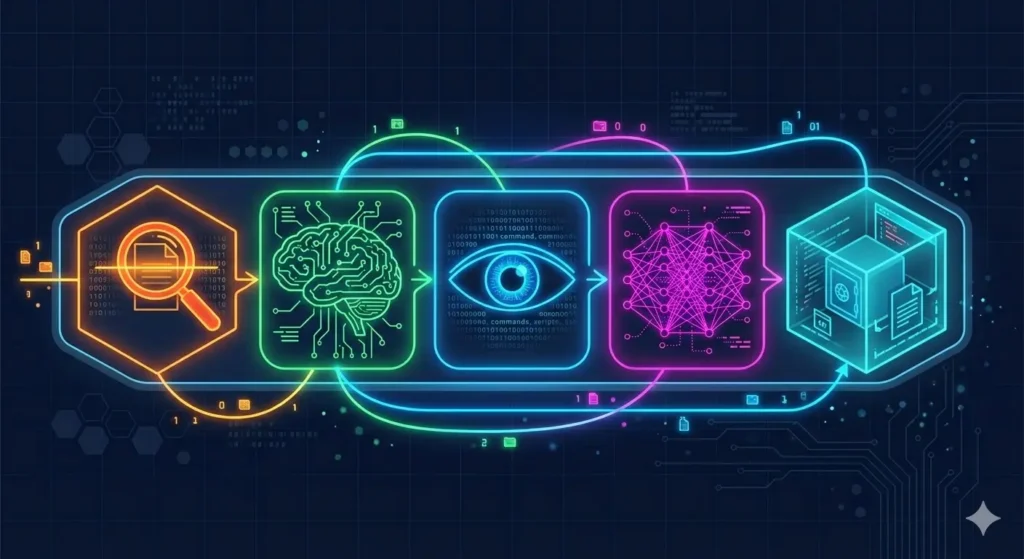
Signature-Based Detection is still around, just doing less heavy lifting than before. Think of it like a bouncer with a “known troublemakers” list — if your file matches something on it, it gets blocked instantly. Fast, efficient, no drama. The catch? If the threat isn’t on the list yet, the bouncer just waves it on through. Not great.
Heuristic Analysis is where it gets smarter. Instead of asking “have I seen this exact file before?”, it asks “does this code look like it’s up to no good?” It hunts for sketchy patterns — weird system calls, hidden payloads, code that seems like it’s trying really hard not to be noticed. This is how it catches polymorphic malware, which is basically malware that keeps changing its outfit to dodge detection.
Behavioral Detection is honestly one of the coolest layers. Rather than judging a file before it runs, this one watches what programs actually do once they’re running. The moment something starts mass-encrypting your files, messing with the registry, or trying to kill your security software — boom, flagged and stopped. Doesn’t matter if it looked totally clean on arrival. This is your ransomware stopper.
AI and Machine Learning is the real heavy hitter these days. These algorithms have been trained on billions of malware samples and can spot brand-new threats just from how they behave — execution patterns, memory usage, weird network calls. And since it’s all cloud-connected, when one computer spots something new, every other protected device learns about it almost immediately. Pretty wild, right?
Sandboxing is like the “hold on, let me test this first” layer. Suspicious files get run inside a completely isolated fake environment. If they try to phone home to a hacker’s server or drop a nasty secondary payload? They get quarantined before ever touching your actual system. Safe, smart, effective.
Features That Actually Matter in 2026 (Skip the Fluff)
Not all antivirus tools are built the same, and some features are genuinely worth paying for. Here’s what to look for:
Real-Time Protection — This one’s non-negotiable. It should be running quietly in the background 24/7, scanning downloads, web traffic, and files on the fly. If it’s constantly tanking your CPU during gaming sessions or video calls, that’s a dealbreaker. Good security shouldn’t make you feel its presence.
Ransomware Rollback — Okay this one is chef’s kiss. Some tools can actually undo a ransomware attack mid-encryption — catching it in the act and restoring your files to how they were before the attack started. Malwarebytes Premium and Windows Defender’s Controlled Folder Access both do versions of this. Absolute game-changer if you ever get hit.
Zero-Day Exploit Protection — Zero-days are the scary ones: attacks that exploit vulnerabilities nobody’s patched yet. Behavioral AI is your best bet here, since there’s no signature to match against. It’s all about spotting how the attack is behaving, not what it is.
Lightweight Performance — Cloud-based scanning means the heavy processing happens on remote servers instead of your machine. So even older or budget laptops can run solid protection without grinding to a halt. If a security tool makes your computer feel sluggish, there are better options.
Multi-Device Support — Realistically, you’ve got a Windows PC, maybe a MacBook, a phone, and a tablet. One subscription should cover all of them. Threats don’t pick favorites, and neither should your protection.
Antivirus vs. EDR: What’s the Difference and Which One Do You Need?
This question comes up a lot, and the honest answer is: it depends on what you’re protecting.
If you’re just a regular person at home, a good next-gen antivirus is genuinely all you need. Web browsing, Netflix, online shopping, gaming — a solid consumer AV with behavioral detection has your back. You don’t need a full-blown security operations center for your home setup.
If you’re running a business, though? That’s a different story. Endpoint Detection and Response (EDR) is in a whole different league. It doesn’t just block threats — it watches everything, logs every process, every network connection, every file change, and lets your security team dig into exactly what happened after an incident. It can isolate a compromised machine, stop threats from spreading across the network, and generate the kind of audit trail that compliance frameworks like HIPAA and PCI-DSS actually require. For a remote workforce or any company handling sensitive data, EDR isn’t optional — it’s essential.
Here’s a quick side-by-side so you can see exactly how they stack up:—
The Best Antivirus Software in 2026 — Here’s What I’d Actually Recommend

There are a ton of options out there, so let me cut through the noise and tell you what’s actually worth your money:
Best for Performance: Kaspersky or Bitdefender Antivirus Plus. If you hate when your security software slows everything down, these two are your go-to. Bitdefender does most of the heavy scanning in the cloud, so your machine barely notices it’s there. Kaspersky is technically excellent too — just worth knowing there’s been some geopolitical controversy around it depending on where you live.
Best All-Rounder: Norton 360. Honestly, if you want one subscription that handles everything — antivirus, VPN, password manager, identity theft monitoring, dark web alerts — Norton 360 is the pick. It’s a bit pricier than the bare-bones options, but you’re getting a whole security suite in one go. Great value if you actually use all the features.
Best for Mac Users: Intego Mac Internet Security X9. Here’s the thing — Macs absolutely do get malware, and most Windows-first antivirus tools just slap a Mac skin on their existing product. Intego was built specifically for macOS from the ground up, which makes a real difference in how well it actually detects Mac-specific threats and adware. If you’re on a Mac, this is the move.
Best for Businesses: Comodo or ESET Endpoint Security. Both give you centralized cloud management, ransomware shields, and device control — everything you need to manage security across a team. ESET in particular is known for being weirdly good at not flagging legitimate stuff as threats, which matters a lot when your security tool accidentally quarantines something your whole team needs.
Free Options — Let’s Be Honest About Them. Windows Defender has genuinely gotten good over the years, and for basic protection it’s not embarrassing anymore. Avast Free and Malwarebytes Free are decent too. But free versions pretty universally skip the good stuff — no advanced phishing protection, no ransomware rollback, no proper firewall controls. Think of free AV as wearing a seatbelt but no airbags. Better than nothing, but don’t get too comfortable.
Why Antivirus Sometimes Fails (And It’s Not Always the Software’s Fault)
Even the best tools have weak spots. Here’s where things tend to go wrong:
You’re the vulnerability. Sorry, but it’s true. Phishing emails are still the number one way hackers get in — and they’re getting scarily convincing. A fake invoice, a spoofed HR email, a fake shipping notification — one wrong click and your antivirus never even got a chance to help. No software can save you from yourself.
Default settings aren’t always the best settings. A lot of antivirus tools ship with certain features turned off or set to “relaxed” to avoid annoying users. Real-time web filtering, USB scanning, behavioral shields — check that these are actually on. A scheduled scan that runs at 3 AM on a machine you shut off every night is doing exactly nothing.
Clever malware goes after the antivirus first. Some of the nastier strains out there try to disable or uninstall your security software before doing anything else. It’s their first move. That’s why tamper protection — a setting that locks your security software so nothing can mess with it — is something you should absolutely make sure is enabled.

Security Best Practices That Go Beyond Just Installing an App
Here’s the thing most security articles don’t say loudly enough: the app is only part of it.
Zero Trust sounds like corporate jargon but the idea is simple — don’t automatically trust anything or anyone, even inside your own network. Always verify. For businesses this means proper identity-aware access controls. For home users it just means being appropriately skeptical of anything asking for permissions or credentials.
Turn on MFA everywhere. Multi-Factor Authentication is genuinely the single best thing you can do for your online security right now. Even if someone steals your password, they still can’t get in without that second factor. Pair it with a password manager that generates unique passwords for every account and you’ve just eliminated like 80% of your risk overnight.
Keep everything updated. Auto-updates on, always. The WannaCry ransomware attack that caused billions in damage? It exploited a vulnerability that already had a patch available. People just hadn’t installed it. Don’t be that story.
Be smart about browsing. Use a VPN on public Wi-Fi. Think twice before clicking links in emails even from people you know. Download software from official sources only. These aren’t complicated habits — they’re just good hygiene.
Quick FAQs From People Who Ask Me This Stuff
Do I really need antivirus on my Mac? Yes! The “Macs don’t get viruses” thing was never fully true, and in 2026 it’s basically a myth. macOS malware, adware, and spyware are real and growing. Apple’s built-in XProtect is better than nothing but it’s pretty basic. Get a dedicated tool — Intego is the best bet for Mac.
Is free antivirus actually good enough? For very basic protection, sure. But you’re giving up a lot — no behavioral detection, no ransomware rollback, no advanced phishing filters. If you do anything sensitive on your device (banking, work stuff, shopping), spending $40–$60 a year on a proper solution is absolutely worth it.
Can antivirus stop every virus? Nope — and don’t trust anyone who says it can. Zero-day threats are the wild card, and behavioral AI helps but isn’t perfect either. That’s exactly why layered security matters. No single thing is your silver bullet.
Can I just run two antivirus programs to be extra safe? Please don’t. They’ll fight each other, slow your machine to a crawl, and potentially create more problems than they solve. One good product, properly configured, beats two products arguing with each other every time.
What is Antivirus Software? Final Thoughts
Here’s my honest take: the days of “install an antivirus and forget about it” are over. The threats are smarter, faster, and more creative than ever, and keeping up with them means thinking about security as an ongoing strategy — not a checkbox.
The good news? You don’t have to turn into a cybersecurity expert. Get a solid next-gen antivirus, turn on MFA, keep your software updated, and stay a little skeptical online. That combination alone puts you miles ahead of most people.
So here’s what I’d suggest: carve out 15 minutes today and give your current setup an honest look. Is it actually using behavioral detection? When did it last update? Have you got MFA on your important accounts? Is your OS current?
If any of those answers made you a bit uncomfortable — time to level up. Cybercriminals in 2026 are not playing around, but with the right setup, neither are you.