
How Does a VPN Work?

Over 1.75 billion people now use a VPN — yet if you asked most of them to explain how a VPN works under the hood, you’d get a lot of blank stares. People know VPNs are good for privacy. They know celebrities and tech bros recommend them. But the actual mechanics? That’s where things get fuzzy. So, how does a VPN Work?
Here’s the reality: understanding how a VPN functions isn’t just a nerdy exercise. It’s the difference between using a powerful security tool correctly and developing a dangerous false sense of protection.
A Virtual Private Network (VPN) is, at its core, an overlay network that uses network virtualization to extend a private, encrypted network across a public one — typically the internet. Think of it as a secure, armored tunnel bored through the chaotic wilderness of the open web.
And the wilderness is getting more dangerous. ISPs in dozens of countries now sell anonymized (and sometimes not-so-anonymized) browsing data to advertisers. Cybercrime has industrialized — complete with SaaS-style ransomware platforms, dark web marketplaces, and nation-state actors hunting vulnerable infrastructure. In this environment, understanding how VPN protects data isn’t optional. It’s essential.
Table of Contents
How does a VPN Work: A 6-Step Technical Journey
Most explanations of how a VPN functions stop at “it hides your IP.” That’s like explaining a car by saying “it moves.” Here’s what’s actually happening every time you hit that connect button.
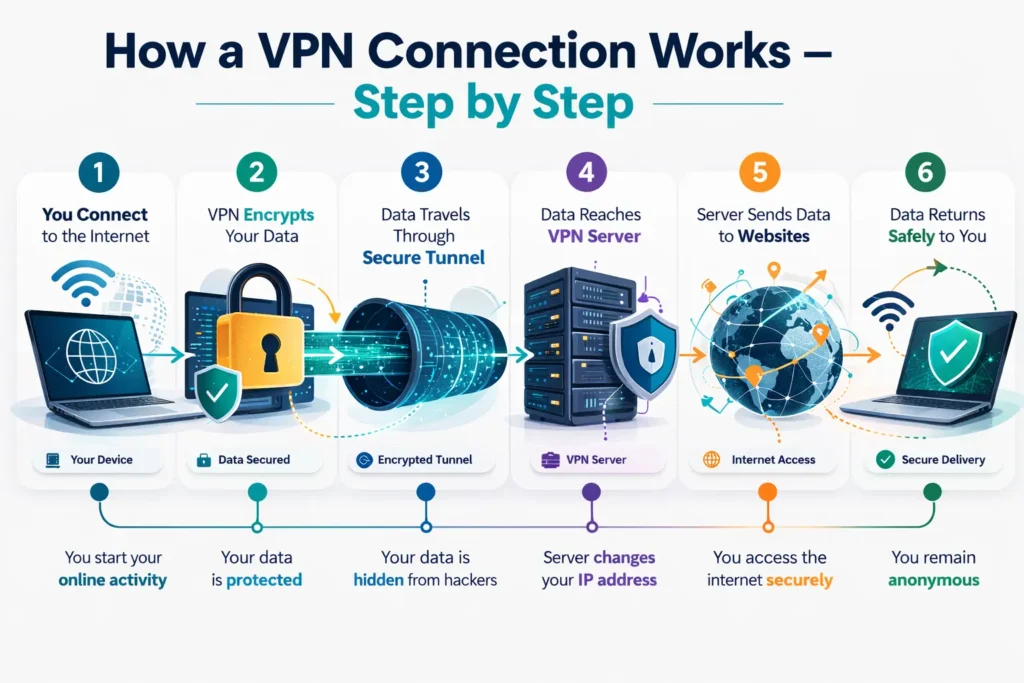
Step 1: Client Initialization
The moment you tap “Connect,” your VPN application begins preparing your device’s networking stack. It configures a virtual network interface (often called a TUN/TAP adapter on desktop systems), which will intercept all outgoing traffic before it ever reaches your physical network card. At this stage, the app also loads your configuration profile — which server you’re connecting to, which protocol to use, and what your DNS settings will be.
Step 2: Authentication & Handshake
Before any data flows, your identity and device must be verified. Depending on the provider and configuration, this can involve:
- Username/password credentials combined with Multi-Factor Authentication (MFA)
- Digital certificates tied to your account or device
- Pre-shared keys in enterprise environments
This handshake is a critical security checkpoint. It ensures that the server you’re talking to is genuinely your VPN provider (not a man-in-the-middle attacker) and that you are who you claim to be. This mutual authentication is one of the reasons enterprise-grade VPNs remain a cornerstone of corporate security.
Step 3: Tunnel Establishment
Once authenticated, a secure tunnel is established. This is the “virtual” part of your Virtual Private Network. Your data gets encapsulated — wrapped inside a new data packet with its own header — before being sent across the internet. This encapsulation hides the original packet’s metadata from anyone monitoring the network, from your ISP to a café Wi-Fi snooper.
Step 4: Advanced Encryption
Before data leaves your device, it is encrypted — mathematically scrambled into unreadable ciphertext. Anyone intercepting the traffic between your device and the VPN server sees nothing but noise. The specific algorithm used depends on the protocol, but modern VPNs typically use AES-256 (Advanced Encryption Standard with a 256-bit key), which is the same standard trusted by governments and militaries worldwide.
This is the core of how VPN protects data: even if someone captures your traffic, they cannot read it without the encryption keys.
Step 5: IP Masking & Server Routing
Your encrypted traffic arrives at the VPN server. From this point forward, all your requests to the outside internet originate from the VPN server’s IP address, not yours. Websites, apps, and tracking services see the server’s location — not your living room in Casablanca or your office in Chicago.
This IP masking is what enables geo-unblocking for streaming, protects your location from advertisers, and prevents websites from building a location-based profile around you.
Step 6: Decryption & Delivery
On the return journey, websites send their responses back to the VPN server. The server re-encrypts that incoming data and sends it back through the tunnel to your device. Your VPN client then decrypts it, and you see the webpage, video, or file as if nothing unusual happened. The entire round trip happens in milliseconds.
The Science of Secrecy: Encryption and Protocols
Understanding how a VPN function relies heavily on understanding its cryptographic foundation.
Encryption Algorithms
VPNs use two categories of encryption working in tandem:
- Symmetric Encryption (AES-256): Used for the bulk data transmission. It’s fast and efficient, using the same key to encrypt and decrypt data. AES-256 is considered computationally unbreakable with current — and foreseeable near-future — technology.
- Asymmetric Encryption (RSA / IKE): Used during the handshake phase to securely exchange the symmetric keys. Since you can’t use AES-256 until both sides share the same key, asymmetric cryptography solves the “how do we share a secret over an insecure channel?” problem. RSA-2048 or higher, and Elliptic Curve Diffie-Hellman (ECDH), are common choices here.

2026 Protocol Performance Comparison
| Protocol | Speed | Security | Best Use Case | Cipher |
|---|---|---|---|---|
| WireGuard | ⚡⚡⚡⚡⚡ | ⭐⭐⭐⭐ | Daily use, streaming | ChaCha20-Poly1305 |
| OpenVPN | ⚡⚡⚡ | ⭐⭐⭐⭐⭐ | Maximum security | AES-256-GCM |
| IKEv2/IPsec | ⚡⚡⚡⚡ | ⭐⭐⭐⭐ | Mobile roaming | AES-256 |
| Lightway (ExpressVPN) | ⚡⚡⚡⚡⚡ | ⭐⭐⭐⭐⭐ | Speed + security balance | ChaCha20 / AES-256 |
| NordLynx (NordVPN) | ⚡⚡⚡⚡⚡ | ⭐⭐⭐⭐ | Optimized WireGuard | ChaCha20-Poly1305 |
WireGuard has emerged as the lean, mean protocol of choice for most consumer scenarios — its codebase is roughly 4,000 lines versus OpenVPN’s 100,000+, which means a dramatically smaller attack surface. OpenVPN remains the gold standard when security trumps speed. IKEv2/IPsec is the champion for mobile users who constantly shift between Wi-Fi and 5G, thanks to its MOBIKE extension that maintains session continuity across network changes.
Proprietary protocols like Lightway and NordLynx represent the industry’s effort to marry WireGuard’s speed with enterprise-grade reliability and enhanced privacy architectures.
Beyond Basics: Different Types of VPN Architectures
Not all VPNs are built for the same purpose. Here’s a breakdown of the major architectural categories.
Personal VPNs
These are the consumer-facing products most people are familiar with — NordVPN, ExpressVPN, Surfshark, and their peers. They’re designed for individual privacy, encrypting personal traffic and allowing users to bypass geo-restrictions for streaming platforms. If you want to watch a show that’s only available in another country, or simply don’t want your ISP building a profile on you, a personal VPN is your tool.
Remote-Access VPNs
The backbone of enterprise security for the past two decades. Remote-access VPNs allow off-site employees to connect to a corporate intranet as if they were physically present in the office. The employee’s device becomes a “virtual” node on the private network, with access to internal databases, shared drives, and applications. This model exploded in adoption during the remote work era and remains critical for hybrid workforces.
Site-to-Site VPNs
Where remote-access VPNs connect individual devices, site-to-site VPNs create permanent secure bridges between entire networks. A company with offices in New York, London, and Dubai can use site-to-site VPNs to merge those three networks into one cohesive private infrastructure, enabling seamless resource sharing without data ever traversing the open internet unprotected.
Mobile VPNs
Mobile VPNs address a unique challenge: endpoints that are constantly roaming. A standard VPN session breaks when you switch from café Wi-Fi to 4G and back. Mobile VPNs use persistent session identifiers that survive these transitions, making them essential for field workers, first responders, and anyone who works on the move.
The Shift to ZTNA
Here’s where the landscape is evolving rapidly. Zero Trust Network Access (ZTNA) is challenging the traditional VPN model for enterprise use. Rather than granting broad network access after a single authentication event, ZTNA verifies every request for every application, regardless of whether the user is inside or outside the corporate perimeter.
The core principle: “never trust, always verify.” ZTNA provides granular, application-specific access controls and is increasingly replacing legacy remote-access VPNs in security-mature organizations — particularly in response to the lateral movement attacks that have plagued traditional VPN architectures.
Business Intelligence: Why Organizations Leverage VPNs
Beyond individual privacy, understanding how a VPN functions reveals why it’s a cornerstone of enterprise security strategy.
Secure Remote Infrastructure
The “work from anywhere” era isn’t going away. Organizations use VPNs to extend their security perimeter to kitchen tables and co-working spaces, ensuring that employees accessing CRM systems, internal code repositories, or financial databases are doing so through an encrypted channel — not raw, exposed internet connections.
Regulatory Compliance
Industries operating under strict data-handling regulations rely on VPN encryption as a compliance mechanism:
- HIPAA requires that protected health information (PHI) be encrypted in transit — VPNs satisfy this requirement.
- PCI DSS mandates secure communication for cardholder data environments.
- SOX compliance for financial reporting can involve encrypted channels for sensitive internal communications.
Failing these audits isn’t just bad optics — it carries multi-million-dollar penalties.
Anonymous Market Research & Competitive Intelligence
Organizations conducting market research need clean, unattributed data. Using a VPN prevents competitors from detecting that a rival company is scouting their pricing pages, job postings, or ad strategies. It also enables accessing region-specific pricing or content without the researching company’s identity being flagged and blocked.
The Reality Check: What a VPN Can and Cannot Do
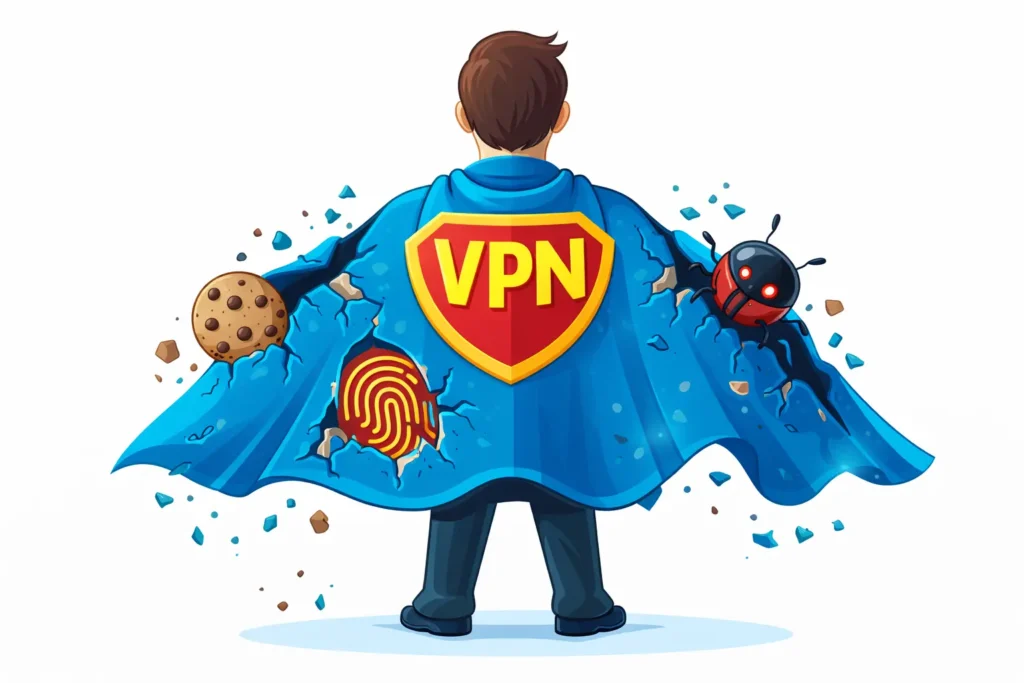
Here’s where we get honest — because marketing language around VPNs has created some dangerous myths.
Myths Debunked
A VPN is not a silver bullet. It does not:
- Stop cookies from tracking your behavior once you’ve accepted them on a site
- Prevent browser fingerprinting, where your device configuration (screen resolution, fonts, browser version) creates a unique identifier that follows you across the web
- Block malware already installed on your device
- Anonymize you completely — your VPN provider can still see your traffic (which is why the no-logs policy matters enormously)
The “No-Logs” Priority
When you use a VPN, your ISP can no longer see your traffic — but your VPN provider can. This is why audited no-log policies are non-negotiable. A reputable provider should have undergone independent third-party audits confirming that they do not retain connection logs, browsing history, or IP addresses. Providers like Mullvad, ProtonVPN, and ExpressVPN have published audit results. If a provider hasn’t been audited, treat their privacy claims with skepticism.
Security Risks: VPNs Are Not Immune
VPN infrastructure itself can become an attack vector. Unpatched VPN gateways have repeatedly made headlines — most notably vulnerabilities like the Ivanti CVE series, which allowed attackers to bypass authentication entirely on enterprise VPN appliances. The lesson: a VPN is only as secure as the software running it. Organizations must maintain rigorous patch management for VPN infrastructure, and individual users should keep their VPN clients updated.
Expert Tips for Choosing a 2026 VPN Provider
With hundreds of options on the market, here’s what separates genuinely secure providers from security theater.
1. RAM-Only Server Infrastructure
Look for providers using diskless, RAM-only servers — ExpressVPN calls this “TrustedServer” technology. Because RAM is volatile memory, every server reboot wipes all data. There is physically nothing stored that could be seized by authorities or exposed in a breach. This is the gold standard for privacy-by-design infrastructure.
2. Kill Switch & Leak Protection
A kill switch is non-negotiable. If your VPN connection drops unexpectedly, a kill switch immediately cuts all internet traffic until the VPN reconnects — preventing your real IP address and unencrypted data from leaking to the open web. Equally important is DNS leak protection, which ensures that your DNS queries (the requests that translate domain names to IP addresses) are routed through the VPN tunnel, not your ISP’s servers.
3. Audited Transparency Reports
Choose providers who submit to regular, independent security audits by recognized firms. Audits should cover both the no-log policy claims and the security posture of server infrastructure. A provider who refuses auditing or who hasn’t been audited in over a year should be viewed with caution.
4. Jurisdiction Matters
The country where a VPN provider is incorporated determines which government can compel them to hand over data. Providers based in privacy-friendly jurisdictions (Switzerland, Iceland, the British Virgin Islands) have stronger legal protections against surveillance requests than those in 5-Eyes or 14-Eyes countries.
Frequently Asked Questions
How does a VPN work and is using a VPN legal? In most countries, yes — VPN use is entirely legal. However, a small number of nations including Russia, China, North Korea, and Belarus restrict or ban unauthorized VPN use. Always verify local regulations before connecting, particularly when traveling. Using a VPN does not make illegal activities legal; it simply encrypts your traffic.
Can a VPN hide my location from everyone? It hides your IP address and physical location from websites, apps, and your ISP — yes. However, your device type, browser configuration, and behavioral patterns remain visible. If you’re logged into Google while using a VPN, Google still knows who you are. True anonymity requires VPN use combined with privacy-focused browsers, no personal account logins, and awareness of fingerprinting techniques.
Does a VPN slow down my internet? Some slowdown is inevitable — your traffic is being rerouted through an additional server and encrypted/decrypted in real time. The impact depends on server distance, server load, and protocol choice. With modern protocols like WireGuard or Lightway, the performance gap has narrowed significantly. A high-quality provider connecting to a nearby server should deliver speeds within 10-15% of your baseline connection. Heavily loaded servers or distant geographic locations can cause more noticeable lag.
What’s the difference between a VPN and Tor? A VPN routes your traffic through a single, trusted server. Tor routes it through three or more volunteer-operated nodes, providing stronger anonymity at the cost of significantly slower speeds. They serve different threat models — VPNs are practical for daily use; Tor is designed for high-stakes anonymity needs.
Conclusion: How Does a VPN Work
Understanding how does a VPN work — truly works, at the packet level — transforms it from a marketing checkbox into a precision tool. You now know that it’s a layered system: authentication, tunneling, encryption, IP masking, and secure delivery, all working in concert to keep your digital life private.
But VPNs operate best as one layer in a broader security posture. Pair yours with Multi-Factor Authentication on all accounts, a privacy-respecting browser, regular software updates, and awareness of phishing threats. No single tool closes every gap — security is a stack, not a switch.
Your immediate action: After setting up or updating your VPN, run a DNS leak test at a site like dnsleaktest.com. If your real ISP’s DNS servers appear in the results, your VPN tunnel is leaking — fix it before assuming you’re protected.
Digital sovereignty isn’t a product you buy. It’s a practice you maintain. Start with understanding the tools you’re using. You’ve just taken that step.